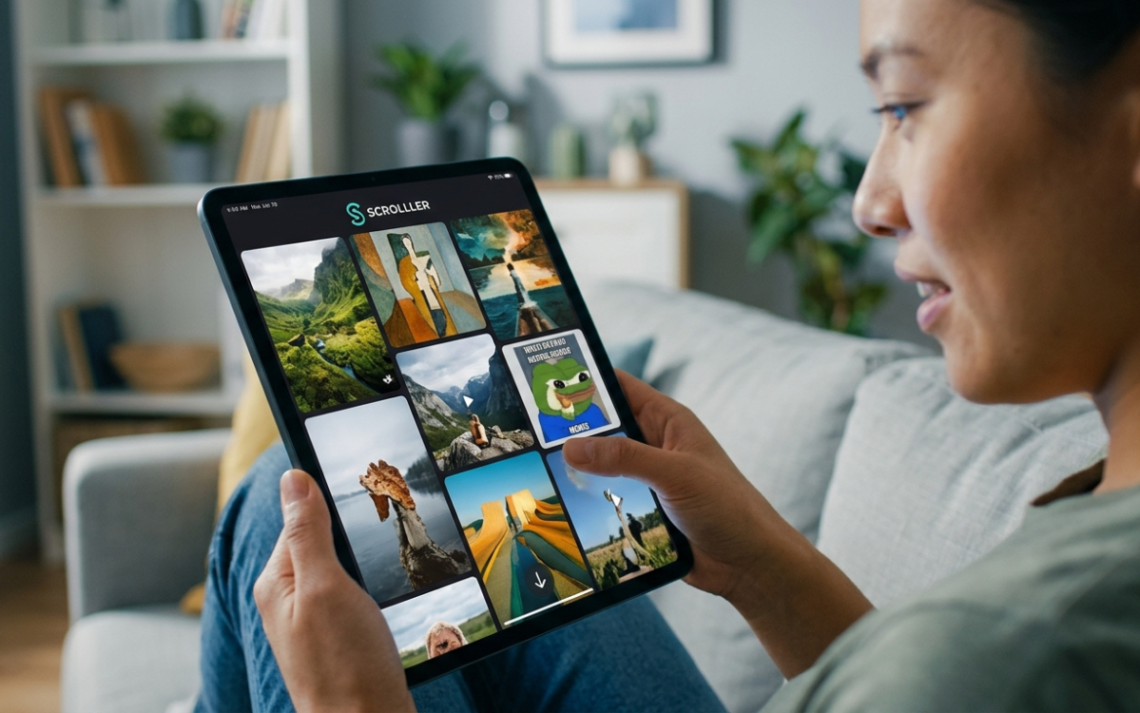
The Scrolller app is best understood as a visual, browser-based way to explore image- and video-heavy Reddit content without navigating Reddit’s usual thread-first interface. Instead of centering comments, karma, sidebars, and discussion trees, Scrolller emphasizes large images, GIFs, short videos, categories, and continuous scrolling—a format that feels closer to a visual discovery feed than a traditional forum.
That distinction matters because people searching for a Scrolller download often encounter similarly named products. As of August 19, 2026, searches of the major app stores surface unrelated products such as “Scroller for Reddit” and other “Scroller” apps, not a clearly verified official native Scrolller listing. For that reason, users should treat Scrolller primarily as a web experience unless the official Scrolller website itself points to a verified mobile-store listing.
What Is the Scrolller App?
At its core, the Scrolller app is a visual content viewer built around media that originates largely from Reddit communities. Multiple independent descriptions of the service consistently characterize it as a browser-based gallery that reorganizes images, GIFs, memes, and short videos into an infinite-scroll interface.
Reddit is designed around communities and conversations. Scrolller changes the reading model. You can move through visual posts rapidly, discover media-first subreddits, and open source content when you want more context rather than starting with the discussion itself.
That makes Scrolller useful for people who want visual discovery without Reddit’s full interface. It is not a replacement for Reddit’s comment culture, moderation tools, voting system, or community participation; it is a different presentation layer.
Is There an Official Scrolller App for Android or iPhone?
This is where many competing articles become unreliable.
I could not verify an official Scrolller app listing on Google Play or Apple’s App Store in current store-focused searches. Results instead surfaced products with similar names, including “Scroller for Reddit,” which explicitly identifies itself as an unofficial Reddit client created by a different developer.
That does not prove that a native Scrolller application can never exist or that availability is identical in every country. App-store distribution changes. It does mean that readers should not assume any app named “Scroller,” “SCROLLER,” or a similar spelling is the official Scrolller product.
How to Use Scrolller on a Phone
The practical route is simple: open Scrolller in a modern mobile browser and use it as a responsive web app. Independent guides describe the service as working on both desktop and mobile browsers, with no installation required for basic browsing. Some also suggest adding the site to the home screen for faster access, which can make a web service feel more app-like without installing an APK.
For security, avoid downloading random APK files labeled as the Scrolller app unless the official site clearly provides or endorses them. An APK mirror can package software under a familiar name while being unrelated to the service you intended to use.
How the Scrolller App Works
The experience is built around aggregation rather than original publishing. Scrolller does not function like Instagram, where the platform revolves around creators uploading directly into platform-native profiles. Independent sources describe it as a viewer that displays publicly available media associated with Reddit communities and links users back toward source material.
The underlying model is straightforward:
- Choose or search for a topic, category, or supported community.
- Scroll through a media-first feed of images, GIFs, and videos.
- Open a visual item for a larger view.
- Follow the source or subreddit when you want comments, context, authorship, or community participation.
- Use content filters where available to reduce unwanted mature material.
This design eliminates much of the “click in, back out, click again” behavior that can make visual browsing slower on discussion-first platforms.
Best Features of the Scrolller App
Its appeal comes less from having dozens of tools and more from removing friction.
1. Infinite Visual Scrolling
Continuous loading is the defining interaction. New media appears as you move through the feed, so there is no traditional page-by-page navigation. Competitor analyses repeatedly identify infinite scrolling as Scrolller’s central usability feature.
That sounds simple, but it changes the browsing experience substantially. Instead of deciding whether each individual post is worth opening, you evaluate content immediately and keep moving.
2. Media-First Presentation
Images and videos occupy the foreground while comment trees, voting controls, flairs, and long text posts are de-emphasized. For photography, memes, wallpapers, art, animals, architecture, travel imagery, and other visual niches, that can make discovery noticeably faster.
This is one reason the Scrolller app attracts people who enjoy Reddit content but do not necessarily want Reddit’s entire interface surrounding every piece of media.
3. Topic and Subreddit Discovery
A strong use case is sampling unfamiliar visual communities before committing to them on Reddit. Scrolller can expose users to niche subreddits and content themes that are easy to miss when browsing only a standard home feed.
There is an important limitation, though. A recent guide correctly notes that Scrolller should not be treated as a complete subreddit directory. Reddit remains the more authoritative destination when you need exhaustive community discovery rather than visual sampling.
4. Low-Friction Browsing
Independent sources report that basic browsing does not require the same account-first workflow common to many social apps. That reduces friction for casual exploration, though exact account, personalization, or premium behavior may change over time.
Less setup means users can arrive with a simple intent—see visual content on a particular topic—and start browsing almost immediately.
5. A Cleaner Bridge to Reddit Media
Scrolller is most valuable when you think of it as a visual lens over Reddit, not as a separate social network. Reddit remains the place for comments, voting, rules, moderation, user identity, and full thread context; Scrolller focuses more heavily on consumption and discovery.
That narrow focus is a feature, not necessarily a weakness. The two experiences serve different search and browsing intents.
Scrolller App vs. Reddit: What Is the Real Difference?
Reddit is built around communities, conversations, ranking, and participation. Scrolller is built around visual consumption.
On Reddit, a post exists inside a larger structure: subreddit rules, moderator actions, comments, votes, user history, post flair, and community norms. On Scrolller, much of that context is intentionally minimized so the media can dominate the screen.
That creates a trade-off. Scrolller can be faster for finding visual content, but Reddit is better when you need attribution, discussion, moderation context, explanations, or the latest community rules.
There is also a platform-dependency issue. Reddit’s current Data API Terms govern how third-party apps may access and display Reddit materials, and Reddit states that user content remains owned by users rather than Reddit. Those terms also restrict how API-sourced content can be used and require compliance with removals and other platform rules.
For users, the takeaway is simple: a third-party Reddit viewer can change when Reddit changes its API, licensing, moderation, or access requirements. The Scrolller app should therefore be viewed as an interface dependent, at least partly, on a larger content ecosystem.
Is the Scrolller App Safe?
“Safe” needs a more precise answer than yes or no.
The service can be used like any other media-heavy website, but users should consider three separate risk categories: content exposure, privacy, and download authenticity.
Mature and NSFW Content
Because Scrolller surfaces media associated with Reddit communities, users may encounter mature or explicit material depending on the categories and filters they use. Reddit itself classifies NSFW content as material that may be inappropriate in workplaces or public settings and provides mature-content controls on its own platform.
Keep safe or mature-content filters enabled when browsing in shared spaces or on devices used by younger people. Do not assume a visual aggregator will perfectly classify every item; Reddit’s own documentation acknowledges that automated mature-content detection can produce false positives and is not guaranteed to catch everything.
That makes content filtering a risk-reduction tool, not a guarantee.
Privacy and Tracking
Treat Scrolller as you would any third-party web service: review its current privacy disclosures, browser permissions, cookies, and account requirements before sharing personal information.
I did not find an easily verifiable current Scrolller privacy-policy page in indexed search results during research for this guide, so it would be irresponsible to make strong claims about exactly what data Scrolller collects today.
That uncertainty is itself useful information. A trustworthy review of the Scrolller app should distinguish what can be verified from what other sites merely repeat.
Fake or Unrelated Downloads
The biggest practical mistake is installing a similarly named app and assuming it is Scrolller. Current store results contain unrelated “Scroller” products with different developers and different privacy disclosures. Verify the developer, publisher, domain, and official outbound links before installing anything.
A familiar icon or similar spelling is not proof of ownership.
Does the Scrolller App Have a Download or APK?
Search intent around “Scrolller APK,” “Scrolller Android app,” and “Scrolller iOS” is understandable because many users prefer a home-screen icon over repeatedly opening a browser. But a downloadable package is not automatically better than a web app.
If no verified official native version exists in your regional app store, the safer option is to use the website in Chrome, Safari, Firefox, or another reputable browser. Adding a website shortcut to the home screen gives you one-tap access without installing an unknown package.
Avoid APK websites that use the Scrolller name without clear publisher verification. Sideloading bypasses parts of the standard app-store distribution and update process, so the burden of checking authenticity falls more heavily on the user.
For anyone specifically searching “Scrolller app download,” this verification step matters more than finding the fastest download button.
Scrolller Pro, Accounts and Premium Features: Verify Before Paying
Several third-party guides mention premium or “Pro” functionality, including possibilities such as ad-free browsing, better filters, saved content, or personalized feeds. Those claims are not consistently documented in primary sources available through search, so feature lists and pricing should be checked directly on Scrolller before purchase.
This is another area where many articles overstate certainty. Scrolller may evolve, and premium features can change faster than evergreen blog posts are updated.
Before paying, confirm:
- The payment page is on the expected Scrolller domain.
- The current price and billing interval.
- Whether renewal is automatic.
- What premium features are actually included.
- How cancellation works.
- Whether a refund policy is provided.
Do not rely on an old screenshot or third-party pricing table when entering payment information.
Scrolller App Pros and Cons
Scrolller is compelling when the goal is fast visual exploration, but its minimalism creates real limitations.
Advantages
- Fast, continuous browsing for images, GIFs, and short videos.
- Less interface clutter than a full discussion platform.
- Useful for finding visual subreddits and niche interests.
- Mobile-browser access can remove the need for a native installation.
- Easy to move from passive discovery toward the original community when source links are available.
- Well suited to visual-first search intent.
Limitations
- Less discussion and community context than Reddit.
- Third-party dependence means API or platform-policy changes can affect functionality.
- Mature content may appear if filters are disabled or imperfect.
- Similar app names create download confusion.
- Attribution and creator context can be easier to miss in an image-first interface.
- Current privacy, premium, and account details should be verified directly rather than assumed from old articles.
The Scrolller app therefore works best when convenience is the priority. It becomes less suitable when source verification, community discussion, or authorship is essential.
Who Should Use the Scrolller App?
The Scrolller app makes the most sense for people who already know they prefer visual browsing over long comment threads.
It can be useful for photographers looking for composition ideas, designers exploring visual themes, meme fans, wallpaper collectors, hobbyists sampling new communities, and casual users who want to browse Reddit media quickly.
There is an important copyright distinction. Finding an image through an aggregator does not make that image free to reuse commercially. Reddit’s Data API Terms explicitly recognize that user content is owned by users, and original rights or licenses still matter.
For research, journalism, publishing, purchasing decisions, or any situation where provenance matters, click through to the original post. Context beats convenience.
Best Alternatives to the Scrolller App
If Scrolller does not fit your needs, choose an alternative based on the job you actually want done.
Reddit is best when you want the original community, comments, voting, moderation context, and full post history. Imgur is more oriented toward image-centric sharing and viral galleries, while Pinterest is stronger when your priority is collecting ideas into organized boards.
Native or third-party Reddit viewers can also offer vertical feeds, offline media, comments, subscriptions, or account syncing. Current app stores, for example, contain independent Reddit-oriented viewers such as Scroller for Reddit and SubStory, but they should not be confused with Scrolller itself.
The right alternative is not necessarily the one that looks most like Scrolller. It is the one that matches your priority: discovery, discussion, organization, offline access, privacy, or creator attribution.
How to Use the Scrolller App More Safely
A few habits make visual aggregators more predictable:
- Use the official domain. Do not rely on look-alike download pages or unofficial APK portals.
- Keep mature-content filters enabled unless you deliberately want access to adult material.
- Open the original Reddit post when authorship, comments, community rules, or context matter.
- Avoid reusing media without permission. Publicly viewable does not mean copyright-free.
- Review permissions and privacy disclosures before signing in or paying.
- Keep your browser and operating system updated and use the privacy protections you normally trust.
- Verify any native app independently. Similar names do not establish an official connection.
- Watch your time. Infinite-scroll interfaces remove natural stopping points, so a browsing limit can prevent a five-minute session from quietly becoming an hour.
These precautions do not make browsing risk-free, but they remove several avoidable problems.
FAQ About the Scrolller App
Is Scrolller an app or a website?
The Scrolller app is more accurately described as a browser-based visual media service than a clearly verified native iOS or Android app. Current searches show several similarly named store listings, but they appear to be separate products from different developers.
For most users, the sensible approach is to access Scrolller through its web interface. A home-screen shortcut can provide quicker mobile access without installing third-party software.
Can I Download the Scrolller App on Android?
A clearly verified official Android listing was not found in current store-focused research. The safer approach is to use Scrolller through your mobile browser unless the official Scrolller site links directly to a Google Play listing.
Be particularly careful with pages offering a “Scrolller APK.” Check the publisher and source rather than trusting the filename.
Is the Scrolller App Free?
Basic Scrolller browsing is widely described by independent guides as accessible without an installation or mandatory payment. Some sources mention premium functionality, but current pricing and plan details should be verified directly on Scrolller rather than relying on third-party summaries.
If you encounter a subscription or payment page, review the current billing terms before purchasing.
Does Scrolller Get Its Content From Reddit?
Yes. Scrolller is consistently described as a third-party visual viewer that organizes media associated with Reddit posts and communities. Reddit’s own developer framework allows qualifying third-party apps to display user content under specific terms and makes clear that ownership of user content remains with users.
That relationship also explains why clicking through to Reddit can be important when you need comments, creator information, or community context.
Is the Scrolller App Safe for Work or Children?
Not automatically. Because the service can surface media from Reddit communities, some content may be mature or NSFW.
Keep content filters enabled, use the service cautiously on shared devices, and remember that even Reddit’s own mature-content detection is not perfect. Reddit provides separate controls for displaying or blurring mature content on its own services.
Final Verdict: Should You Use the Scrolller App?
The Scrolller app is valuable because it solves one narrow problem extremely well: it turns Reddit-heavy visual discovery into a cleaner, faster, continuous browsing experience. If you mainly want images, GIFs, short clips, visual inspiration, or a quick way to sample media-focused communities, that simplicity can be a genuine advantage.
Use it with the right expectations. Access Scrolller through its official web presence, verify any native download before installing it, keep mature-content controls aligned with your preferences, and click through to Reddit when attribution or context matters.
If your priority is discussion, community participation, moderation transparency, or creator identity, go directly to Reddit. If your priority is frictionless visual discovery, the Scrolller app remains an appealing way to browse—provided you treat it as a third-party viewing layer rather than a fully independent social network.