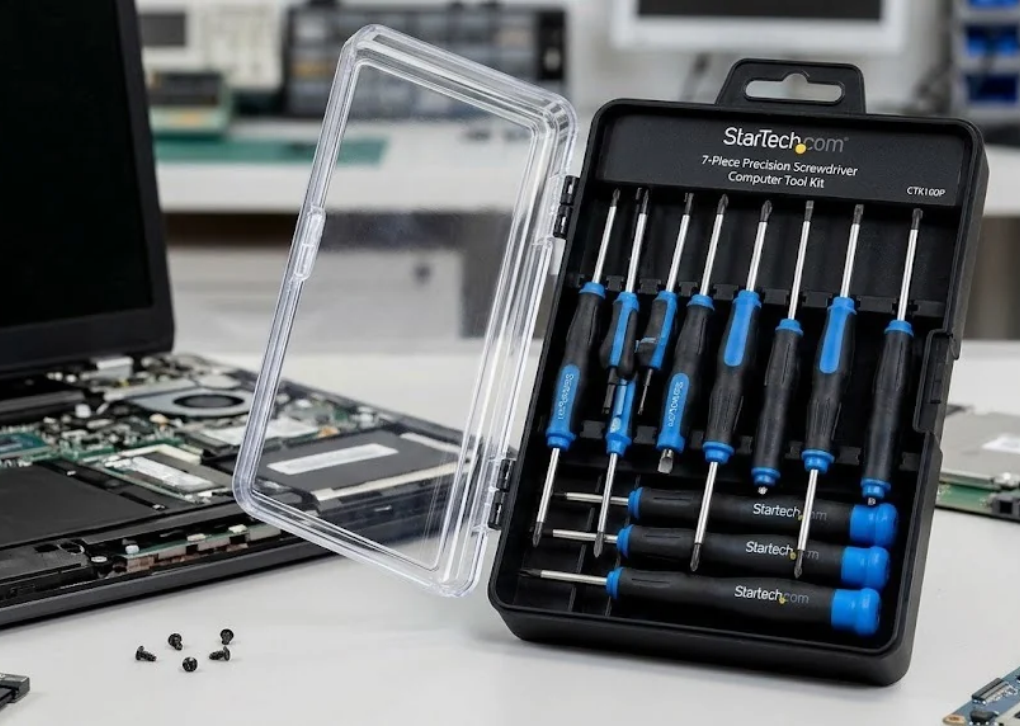
The StarTech.com 7 Piece Precision Screwdriver Computer Tool Kit is a compact screwdriver set designed for computer maintenance, hardware installation, and small repair tasks. Identified by the model number CTK100P, it brings together seven dedicated screwdrivers covering common slotted, Phillips, and Torx screw types. Rather than relying on one interchangeable-bit driver, users get individual tools for specific screw sizes, making it easier to select the correct tip for a job.

TAA+1
For IT technicians, computer enthusiasts, repair professionals, and home users who regularly open electronic equipment, having the correct screwdriver can make a noticeable difference. A properly matched tip helps maintain contact with the screw head, reduces slipping, and supports more controlled fastening. However, a seven-piece set is not a universal electronics repair kit, so understanding its contents and limitations is essential before purchasing.
This guide examines the kit’s specifications, screwdriver types, practical applications, advantages, limitations, maintenance requirements, and alternatives to consider. It also explains how to decide whether the CTK100P is suitable for your repair workflow.
What Is the StarTech.com 7 Piece Precision Screwdriver Computer Tool Kit?
The StarTech.com 7 Piece Precision Screwdriver Computer Tool Kit is a dedicated hand-tool set for routine computer servicing and installation work. Its seven screwdrivers cover three slotted sizes, two Phillips sizes, and two Torx sizes. The manufacturer lists the kit for repair technicians and hobbyists who need a selection of commonly used precision screwdrivers.
TAA+1
The product is designed around a straightforward idea: provide frequently needed screwdriver types in one organized package. Each tool has a specified tip size and a 50 mm shaft length, while the set is supplied as a group of magnetic precision drivers.
The product’s model number is CTK100P. That identifier is useful when comparing retailer listings, checking specifications, requesting support, or confirming that a seller is offering the intended product rather than a similarly named screwdriver kit.
Who Should Consider This Screwdriver Set?
The kit may suit several types of users:
IT support technicians who perform routine desktop computer maintenance.
PC builders who install or remove compatible screws during hardware assembly.
Electronics hobbyists working on equipment that uses supported screw profiles.
Small repair businesses that need a compact set of frequently used manual drivers.
Home users who prefer dedicated screwdrivers for occasional maintenance tasks.
It is less suitable for someone seeking a comprehensive smartphone repair kit, a precision bit assortment for every electronics fastener, or a powered screwdriver system.
StarTech.com 7 Piece Precision Screwdriver Computer Tool Kit Specifications
Before purchasing, compare the manufacturer’s specifications with the demands of your typical repair jobs. The following details are listed in the product documentation.
TAA+1
| Specification | Details |
|---|---|
| Brand | StarTech.com |
| Model | CTK100P |
| Product type | Precision screwdriver set |
| Number of tools | 7 |
| Slotted screwdrivers | 2.0 mm, 2.4 mm, 3.0 mm |
| Phillips screwdrivers | No. 00 and No. 1 |
| Torx screwdrivers | T15 and T20 |
| Shaft length | 50 mm each |
| Magnetic drivers | Yes, listed as a magnetic set |
| Product color | Blue and gray are listed by retailers |
| Product dimensions | Approximately 170 × 140 × 23 mm |
| Product weight | Approximately 116 g, according to the manufacturer’s datasheet |
| Manufacturer’s stated warranty | 2 years |
TAA+2
Important: Retailer listings sometimes report different package dimensions or weights because they measure the packaging, use different data feeds, or list shipping information. Confirm the exact specification and warranty applicable to your region with the seller before ordering.
What Comes in the StarTech.com 7 Piece Precision Screwdriver Computer Tool Kit?
The main strength of this kit is its selection of seven individual screwdriver types. Each is intended for a particular screw profile or size, which helps users avoid forcing an unsuitable tip into a fastener.
Designed for small screws with a straight slot across the head. It can be useful on compatible brackets, covers, and other hardware with slotted fasteners.
Provides a slightly wider blade for slotted screws with a matching head. Choosing the correct width helps prevent the blade from slipping out of the slot.
3. Slotted screwdriver — 3.0 × 50 mm
The largest slotted driver in the set. It is more appropriate for compatible wider slots than the two smaller slotted drivers.
A small cross-head driver for compatible fine-threaded fasteners. It may be useful in delicate hardware assemblies where a Phillips 00 profile is specified.
Offers a larger cross-head profile than Phillips 00. It is useful for compatible screws in computer hardware, brackets, and general equipment assemblies.
Designed for compatible six-point star-shaped Torx fasteners. Torx drivers are commonly used in equipment where the fastener design calls for controlled rotational force.
The larger of the two Torx drivers supplied. It is suitable for compatible T20 fasteners, not smaller Torx screws that require another size.
The seven tip sizes and 50 mm shaft lengths are based on the manufacturer’s CTK100P documentation. The images above are illustrative examples of screwdriver styles, not verified photographs of the exact tools supplied.
TAA+1
Why Does Having Seven Separate Screwdrivers Matter?
A dedicated screwdriver can be more convenient than a loose-bit arrangement when you repeatedly use the same few sizes. You can select the required tool immediately, without searching through a bit case or changing attachments between fasteners.
The trade-off is flexibility. An interchangeable-bit kit can accommodate many more screw profiles in a smaller storage footprint, provided it includes the appropriate bits and a suitable handle. The CTK100P instead prioritizes seven specified, ready-to-use drivers.
Main Features of the StarTech.com 7 Piece Precision Screwdriver Computer Tool Kit
1. Three Common Screwdriver Profiles
The combination of slotted, Phillips, and Torx drivers covers several established screw-head designs. This is useful for technicians who encounter different fastener styles across computer components and general equipment.
However, a screwdriver should match the actual screw profile, not simply look similar. A Phillips driver, for example, is not interchangeable with every cross-shaped or combination screw head.
2. Dedicated 50 mm Shafts
Each listed driver has a 50 mm shaft. This provides a consistent working length across the set and can be practical for accessible screws in small assemblies.
A 50 mm shaft is not especially long. Recessed fasteners, deep enclosures, or screws obstructed by cables and components may require a longer driver or a different tool geometry.
3. Magnetic Precision Drivers
The manufacturer’s datasheet describes the kit as a magnetic precision-driver set. Magnetic tips can help retain compatible steel screws while positioning or removing them, especially when working around small components.
TAA+1
Magnetism is a convenience, not a guarantee that a screw will stay attached in every position. It also does not replace careful handling around sensitive electronic assemblies.
4. Compact Storage
The manufacturer’s listed dimensions are approximately 170 × 140 × 23 mm, making the kit relatively compact for a bench drawer, service bag, or workstation.
TAA+1
An organized set is particularly useful in shared workshops. When every driver has a designated place, missing tools are easier to spot and the correct size is easier to find.
5. Manufacturer Warranty
The published product information lists a two-year warranty. Retailer listings also mention technical support, although service conditions can depend on the applicable regional terms.
TAA+2
Before buying, check the seller’s warranty process, proof-of-purchase requirements, and whether the warranty applies in your country. A manufacturer’s stated warranty should not be assumed to mean identical coverage in every market.
Practical Uses: What Can You Repair with This Screwdriver Kit?
The usefulness of the set depends on the screw types fitted to the equipment. It is a collection of mechanical hand tools, not a device-specific repair solution.
Desktop Computer Assembly and Maintenance
For desktop PCs, a compatible screwdriver can help with tasks such as:
Removing and refitting screws on suitable chassis panels.
Installing compatible expansion-card brackets.
Securing supported mounting hardware.
Tightening or removing compatible screws during routine component replacement.
Performing general mechanical maintenance on accessible computer assemblies.
Not every desktop fastener uses one of these seven sizes. Check the screw head before selecting a driver, and avoid applying force if the tip does not seat securely.
Laptop Servicing
The kit may be useful for certain laptop repairs, particularly where the manufacturer specifies compatible Phillips or Torx screws. It should not, however, be treated as a complete laptop opening kit.
Many laptops use small Phillips screws, Torx fasteners, proprietary screw profiles, or other designs that are absent from this set. Opening a laptop may also require plastic spudgers, non-marring picks, or other tools to release clips without damaging the enclosure.
Computer Accessories and Peripherals
Printers, keyboards, peripheral housings, docking stations, and other electronic products may use compatible fasteners. The CTK100P can help with mechanical servicing when the correct screw profile is present and the device can safely be opened.
Always consult the equipment’s service documentation before disassembly. Some products contain delicate ribbon cables, spring-loaded components, or parts that are difficult to reinstall without model-specific instructions.
General Electronics Hobby Projects
Hobbyists can also use the kit for projects involving compatible screws in small enclosures, brackets, and mechanical assemblies. Having several dedicated drivers available is handy for repeat work at a home workbench.
It is less useful for projects dominated by tiny specialty fasteners, such as pentalobe screws, security Torx screws, or miniature hex screws. Those require matching tools that are not included in the seven-piece selection.
How to Use the StarTech.com 7 Piece Precision Screwdriver Computer Tool Kit Safely
Correct technique matters as much as the tool itself. Even a well-matched screwdriver can damage a fastener if it is used at the wrong angle or with excessive force.
Step 1: Disconnect the equipment
Shut down the computer and disconnect external power before servicing it. Follow the device manufacturer’s battery-disconnection and electrostatic-discharge precautions where applicable.
Step 2: Identify the screw head
Inspect the fastener and determine whether it is slotted, Phillips, Torx, or another type. Confirm the size rather than guessing from the screw’s overall diameter.
Step 3: Seat the driver properly
Place the tip fully into the screw head. It should fit snugly, with minimal rocking or side-to-side movement.
Step 4: Apply controlled pressure
Keep the screwdriver aligned with the screw axis and use steady, moderate force. Stop if the tool slips, the head begins to deform, or the fastener refuses to turn.
Step 5: Organize screws and inspect the result
Store removed screws in a compartmented tray and record where they came from. After reassembly, verify that cables, covers, and brackets are properly positioned before reconnecting power.
Electrostatic Discharge: An Important Consideration
The presence of precision screwdrivers does not make a workspace ESD-safe. Electrostatic discharge can damage sensitive computer components even when no visible damage occurs.
Use an appropriate ESD mat and grounded wrist strap when required by the service procedure. Avoid touching exposed circuit contacts, and remember that a magnetic screwdriver tip is not a substitute for electrostatic protection.
Advantages and Limitations of the StarTech.com 7 Piece Precision Screwdriver Computer Tool Kit
A useful buying decision considers not just what a product includes, but also the jobs it cannot handle. The CTK100P is a focused set rather than an all-purpose electronics repair collection.
Key Advantages
Seven dedicated drivers: The kit provides three slotted, two Phillips, and two Torx screwdrivers.
Ready-to-use tools: Individual screwdrivers eliminate the need to swap interchangeable bits.
Magnetic tips: These can make handling compatible small screws easier.
Compact footprint: Its listed dimensions make storage straightforward.
Defined product specifications: The model number makes it easier to verify the correct set before ordering.
Published two-year warranty: The manufacturer lists warranty coverage for the product.

TAA+1
Limitations to Consider
Limited tip selection: Seven drivers cannot cover every screw found in modern computers and electronics.
No specialty security bits listed: Security Torx, pentalobe, tri-point, and other proprietary profiles are not part of the documented selection.
No interchangeable-bit system: You cannot expand the set simply by adding compatible bits to a supplied bit holder.
No powered driver: All fastening work is manual.
No complete disassembly accessories: The published contents do not list spudgers, tweezers, ESD equipment, or opening picks.
The biggest limitation is versatility. If you regularly repair laptops, smartphones, gaming consoles, and other devices with different fastener designs, you may need an additional electronics toolkit.
StarTech.com 7 Piece Precision Screwdriver Computer Tool Kit vs. a Multi-Bit Repair Kit
Choosing between dedicated screwdrivers and an interchangeable-bit set depends on your workflow.
| Buying consideration | CTK100P | Multi-bit precision kit |
|---|---|---|
| Tool arrangement | Seven individual drivers | One or more handles with interchangeable bits |
| Documented tip selection | Seven specified profiles and sizes | Depends on the included bits |
| Changing tip sizes | Select another screwdriver | Replace the bit |
| Specialty screw coverage | Limited to the included drivers | Can be broader if specialty bits are included |
| Storage | Compact dedicated set | Varies with the number of bits and accessories |
| Best use case | Repeated work with supported screw types | Mixed repair jobs requiring varied fasteners |
Neither format is automatically better. Dedicated screwdrivers are convenient when the same sizes are used repeatedly, while a multi-bit kit can be more economical in terms of storage and coverage when working across many device categories.
For a computer technician who frequently encounters the seven specified profiles, the CTK100P may be a practical addition to a workbench. For a repair shop handling a broad mix of consumer electronics, a larger bit kit may be the better primary purchase.
What to Check Before Buying the CTK100P
Product listings can look almost identical while differing in model number, included accessories, or warranty details. Use this checklist before placing an order.
Buying the Kit in Pakistan
For buyers in Pakistan, availability, shipping costs, and import-related charges may influence whether this set represents good value. An overseas listing may have a low advertised price but become less attractive after delivery charges and taxes are added.
Ask the seller to confirm the CTK100P model number, the seven included screwdriver sizes, and the warranty terms before paying. If local stock is unavailable, compare the fully delivered cost of importing the set against a reputable locally available precision screwdriver kit with the profiles you actually need.
Buying tip: Do not choose a screwdriver set on piece count alone. Seven correctly selected drivers can be more useful for your work than a much larger kit filled with profiles you rarely use.
How to Maintain Your Precision Screwdrivers
A small amount of care helps preserve tip fit and reduces the risk of damaging fasteners.
Clean the tips after use. Remove dust, grease, and metal particles with an appropriate dry cloth.
Inspect the working ends. Look for rounded edges, chipped tips, or wear that prevents a secure fit.
Avoid using drivers as pry bars. Applying sideways force can damage the tip and compromise its fit.
Store the tools securely. Keep them together in their designated case or organizer rather than loose in a bag.
Use the right tool for the torque required. If a fastener is unusually tight, investigate the cause instead of forcing a small precision screwdriver.
Keep screws organized during repairs. Different screw lengths can damage internal components if installed in the wrong locations.
Precision drivers work best when the tip remains in good condition. A worn driver that slips repeatedly should be replaced rather than forced into service.
Is the StarTech.com 7 Piece Precision Screwdriver Computer Tool Kit Worth Buying?
The answer depends on the work you intend to perform. The CTK100P has a clear purpose: provide a compact selection of seven individual drivers for compatible fasteners in computer maintenance, installations, and general repair work.
It is a reasonable candidate if you value straightforward tool selection, frequently use the included screw profiles, and do not need a large collection of interchangeable bits. The magnetic-driver arrangement and published warranty are additional practical considerations.
However, anyone expecting a complete laptop or smartphone repair kit should look beyond the product name. This set does not document the specialty bits and opening accessories required for many modern electronics.
Quick Buying Verdict
A good fit for
Routine computer maintenance, compatible hardware installations, hobby projects, and workshops that repeatedly use the seven included screwdriver types.
Consider another kit if
You need extensive laptop or mobile-device coverage, security screwdrivers, many interchangeable bits, plastic opening tools, or powered fastening.
Frequently Asked Questions
1. What is the StarTech.com 7 Piece Precision Screwdriver Computer Tool Kit used for?
The CTK100P is designed for computer maintenance, hardware installation, and compatible small repair tasks. It contains seven individual screwdrivers covering slotted, Phillips, and Torx fasteners. Its usefulness depends on whether the equipment uses one of the included tip profiles and sizes.
TAA+1
2. Which screwdriver sizes are included in the CTK100P?
The set contains three slotted drivers measuring 2.0, 2.4, and 3.0 mm; two Phillips drivers, No. 00 and No. 1; and two Torx drivers, T15 and T20. The manufacturer lists a 50 mm shaft length for each driver. Check the fastener specifications before use, because visually similar screws can require different tip sizes.
TAA+1
3. Can this precision screwdriver kit be used for laptop repairs?
Yes, for laptop fasteners that match the included profiles and sizes. However, it is not a complete laptop repair kit, since some laptops use specialty screw types and require non-marring opening tools. Follow the manufacturer’s service instructions and disconnect power before working on internal components.
4. Are the screwdrivers magnetic, and why does that matter?
Yes. The manufacturer identifies the product as a set of magnetic precision drivers. Magnetic tips can help retain compatible steel screws during removal and installation, which is useful when working with small fasteners. They do not eliminate the need for careful handling or appropriate electrostatic-discharge precautions.
TAA+1
5. Does the StarTech.com CTK100P come with a warranty?
The manufacturer’s published product documentation lists a two-year warranty. The exact terms, claim procedure, and regional coverage should be confirmed with the seller or manufacturer before purchasing, particularly for internationally shipped orders.
TAA+1
Final Thoughts
The StarTech.com 7 Piece Precision Screwdriver Computer Tool Kit is best understood as a focused set of everyday screwdrivers, not an all-in-one electronics repair solution. Its seven specified profiles, magnetic-driver arrangement, compact format, and published two-year warranty make it worth considering for users whose work matches its capabilities.
Before buying, compare the included sizes with the fasteners in your equipment, verify the CTK100P model number, and calculate the full delivered cost. If the seven drivers cover your regular tasks, the set may be a sensible addition to your toolbox. If your work spans many different devices and proprietary screw types, prioritize a broader precision bit kit instead.