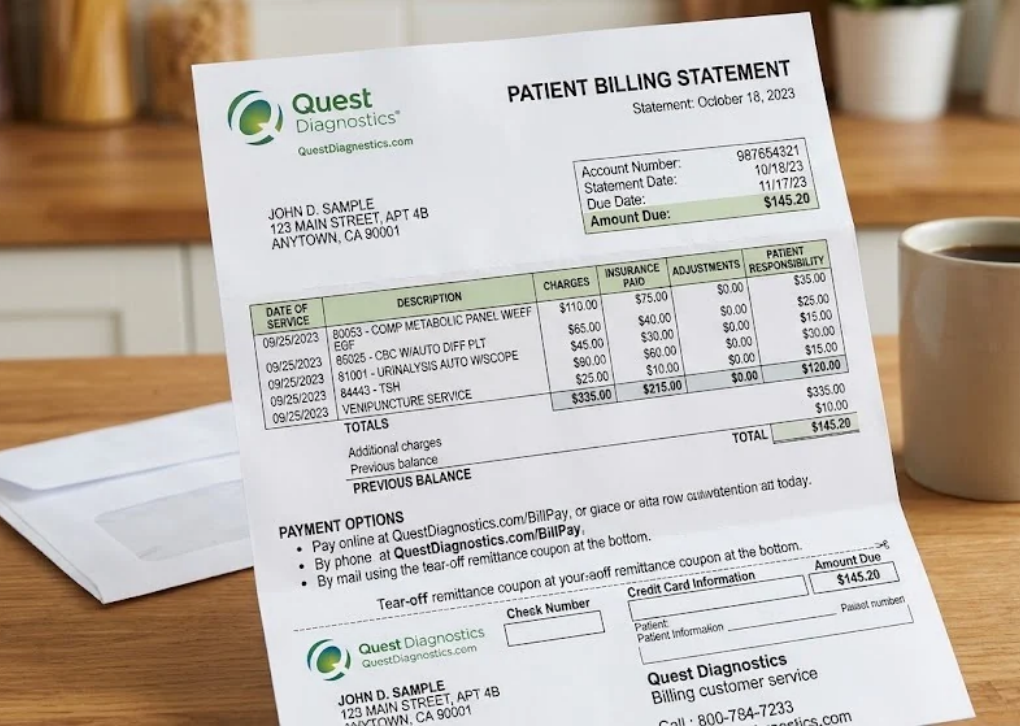
If you have received a laboratory invoice or need to check an outstanding payment, understanding your Questdiagnostics.com bill can help you avoid unnecessary delays, identify insurance-related charges, and manage your healthcare expenses more confidently. Quest Diagnostics provides an official online billing portal where patients can pay invoices, check bill status, and update insurance information.

Quest Billing+1
The process is generally straightforward, but questions can arise. You might have misplaced your bill number, received a charge after your insurance processed a claim, or noticed that a recent payment has not appeared in your account. Knowing which official resources to use—and what to verify before paying—can make these situations much easier to handle.
This guide explains how the Quest Diagnostics billing system works, how to make a payment, what common laboratory billing terms mean, and what steps to take when a charge looks incorrect.
Official resources to bookmark:
Pay or check a bill: Quest Diagnostics Patient Billing Portal
Billing questions and insurance information: Official Billing and Insurance Page
Payment assistance: Quest Diagnostics Financial Assistance
Use these official websites rather than links in unexpected payment messages. Quest Diagnostics warns patients to verify suspicious billing communications before sharing personal or financial information.
Quest Billing+2
What Is Questdiagnostics.com Bill?
The term Questdiagnostics.com bill generally refers to a patient invoice for laboratory testing services provided by Quest Diagnostics. These services may include blood tests, urine tests, specimen analysis, and other laboratory procedures ordered by a healthcare professional.
A laboratory bill is not necessarily the same as a doctor’s bill. Your physician may charge for an office visit, consultation, or other medical services, while Quest Diagnostics may separately bill for processing and analyzing your laboratory specimens.
Quest Corporate+1
The official billing portal allows eligible patients to access billing information using details from their invoice. Depending on the available account options, patients can pay a balance, review its status, or update insurance information.
Why Did You Receive a Quest Diagnostics Bill?
There are several common reasons a laboratory invoice may arrive, even when you have health insurance.
Insurance information was missing: The laboratory may not have received your current insurance details when the test was ordered.
A claim was denied: Your insurer may have determined that a test or part of the service was not covered.
Your deductible applies: You may owe some or all of the allowed charge until you meet your plan’s deductible.
Copayment or coinsurance applies: Your insurance plan may require you to pay a defined amount or percentage.
Insurance processing is incomplete: The insurer may still need information before it can finalize the claim.
Additional testing was performed: A physician may have requested an additional test, or the original test may have triggered a clinically indicated reflex test.
Quest Corporate+1
Receiving an invoice does not automatically mean an error has occurred. However, you should compare the bill with your insurance Explanation of Benefits (EOB) before assuming the amount is correct.
How to Pay Your Questdiagnostics.com Bill Online
The fastest way to manage a patient laboratory invoice is through the official Quest Billing Portal. You generally need the bill number, the patient’s date of birth, and the ZIP code associated with the billing record to access the invoice.
Quest Billing+1
Visit patientbill.questdiagnostics.com. Check the domain carefully before entering any information.
Step 2: Enter your billing details
Enter your bill number, date of birth in the requested format, and the patient’s billing ZIP code. Follow the on-screen verification instructions.
Confirm the patient’s details, outstanding balance, and any available invoice information before choosing a payment option.
Choose an available payment method, complete the transaction, and retain the confirmation or receipt for your records.
The images above are illustrative. The portal’s actual layout and available options may change. Official access instructions:
Quest Billing+1
What Payment Methods Does Quest Diagnostics Accept?
The official billing portal lists several payment methods. The options displayed for your invoice may depend on the payment service available to you.
Quest Billing+1
| Payment method | What to know |
|---|---|
| Bank account or eCheck | Pay directly from an eligible checking or savings account. |
| Credit card | Use an accepted credit card through the official portal. |
| Debit card | Pay using an accepted debit card. |
| HSA or FSA | Use an eligible health savings or flexible spending account payment method. |
| PayPal | The portal lists PayPal as an available payment option, subject to the terms shown at checkout. |
Before submitting payment, check the amount carefully. If you believe insurance should cover some of the charge, investigate the claim before paying an amount you do not understand.
Can You Pay a Questdiagnostics.com Bill Without a Bill Number?
Yes, the official billing portal provides a “Don’t have my bill number” option. Select it and follow the instructions provided by the website to retrieve or verify your billing information.
Quest Billing+1
If the online recovery process does not work, contact Quest Billing Customer Service at 1-866-697-8378 (1-866-MYQUEST). You can also use the contact information printed on your invoice.
Do not guess the bill number repeatedly. The portal warns that too many unsuccessful attempts can temporarily restrict access, so follow the account recovery instructions if verification fails.
Quest Billing+1
How to Check Your Quest Diagnostics Bill Status
Checking the status of your Quest Diagnostics invoice helps you determine whether an amount remains due, whether a payment has been recorded, and whether you need to contact customer service.
Start with the official patient billing website. Enter the requested invoice information and review the available account details.
How to Check Whether Your Payment Was Received
If you recently paid your bill but the balance still appears outstanding, do not automatically submit another payment.
Quest Diagnostics states that payments may take up to seven days to appear in the online balance. During that period, save your transaction confirmation and check the account again before paying a second time.
Quest Corporate+1
Follow this checklist:
A bank authorization, a completed payment, and an updated laboratory billing balance are not always visible at the same time. The transaction receipt is useful evidence while the account is being updated.
How to Get a Copy of Your Quest Diagnostics Invoice
If you misplaced your paper bill, begin by using the official billing portal’s bill-number recovery option. You can also contact customer service to request assistance with obtaining a copy of your invoice.
Quest Billing+1
When requesting a copy, have relevant details ready, such as the date of service and the billing information you can safely verify. Use the official contact channel rather than sending personal medical or financial details to an unverified email address.
How to Understand Your Questdiagnostics.com Bill
A laboratory invoice can be confusing because it may include several charges, insurance adjustments, and patient-responsibility amounts. The best way to understand a Questdiagnostics.com bill is to compare its details with your insurance Explanation of Benefits and the services your healthcare professional ordered.
Here are the most useful terms to recognize.
| Billing term | Meaning |
|---|---|
| Amount billed | The amount initially submitted for the laboratory services. |
| Insurance adjustment | An adjustment made under applicable billing or insurance arrangements. |
| Copayment | A fixed amount your insurance plan requires you to pay for a covered service. |
| Deductible | The amount you may need to pay for eligible healthcare services before your plan begins paying under its deductible rules. |
| Coinsurance | Your percentage share of eligible costs under your insurance plan. |
| Patient responsibility | The amount assigned to you after the applicable billing and insurance processing. |
| Balance due | The amount the billing account currently indicates is unpaid. |
| Explanation of Benefits (EOB) | A statement from your insurer explaining how it processed a claim; it is generally not itself a bill. |
Exact terminology and the way charges are displayed may vary by invoice. Quest Diagnostics provides an official billing FAQ and resources to help patients interpret their laboratory statements.
Quest Corporate+1
Why Is the Patient Responsibility Higher Than Expected?
A higher-than-expected balance can result from several different issues. For example, your deductible may not have been met, the test may not qualify for coverage under your plan, or the insurer may have processed a claim using information that needs correction.
To investigate, compare three records:
The Quest invoice: Identify the service, billed amount, and balance due.
The insurer’s EOB: Check the allowed amount, adjustments, denial reason if any, and patient responsibility.
Your insurance policy or member portal: Verify the applicable coverage, deductible, copayment, and coinsurance rules.
If the figures do not agree, ask the insurer to explain its claim determination and ask Quest to review the invoice. Request a corrected claim when appropriate rather than assuming that every difference is a billing error.
What Is a Laboratory Draw Fee?
A draw fee may cover the collection of a specimen at a Quest Diagnostics Patient Service Center. Quest explains that insurance may cover this fee, but patients whose plans do not cover it—and uninsured patients—may be responsible for paying it.
Quest Corporate
If you see a separate specimen collection charge, ask whether it is covered by your insurance and whether it is included in the amount assigned to your deductible or coinsurance. The answer depends on your specific plan and the services provided.
Why Was I Charged for an Additional Laboratory Test?
An additional test may be performed if the ordering physician requests further testing or if a result triggers a reflex test under the laboratory’s testing process. A reflex test is an additional analysis performed when the initial test meets specified criteria.
Quest Diagnostics identifies these as reasons why a patient may see a charge for a test that was not explicitly listed on the original order.
Quest Corporate
If you do not recognize the additional service, request the test name, date of service, and relevant ordering information. If the concern involves medical necessity or the reason for ordering the test, your physician’s office may be able to clarify it.
How to Fix Insurance Problems on a Questdiagnostics.com Bill
Insurance problems are among the most important reasons to review a laboratory invoice carefully. If Quest has outdated insurance information, a claim may be denied or processed incorrectly even when you have active coverage.
Fortunately, Quest provides an online option to update insurance information associated with an eligible bill.
Quest Corporate+1
Step 1: Check Your Insurance Information
Review the insurance details on your invoice and compare them with your current insurance card. Confirm that the policy was active on the date of service and that the member information is correct.
Pay particular attention to:
Insurance member ID and group number.
Policyholder name and date of birth.
Insurance coverage dates.
The name of the insurer or plan.
Whether the laboratory is considered in-network under your specific plan.
You can check whether Quest participates in your plan using its official insurance lookup tool. Remember that network participation does not guarantee coverage for every test.
Quest Corporate+1
Step 2: Update Your Insurance on the Official Portal
Visit the Quest Billing Portal and authenticate using the information requested for your bill. If the option is available, select Update Insurance and provide your correct insurance details.
Keep your insurance card nearby while completing the process. Quest states that it can resubmit a claim after eligible insurance information has been corrected.
Quest Corporate+1
Step 3: Contact Your Insurance Company if a Claim Was Denied
If your insurer denied the claim because of a diagnosis code, coverage restriction, or missing information, contact the insurer to understand the reason. If the issue concerns the diagnosis information supplied by your ordering physician, Quest advises contacting the physician’s office.
Quest Corporate+1
Ask the insurer whether the claim can be reconsidered, corrected, or appealed. Follow any deadlines stated in the insurer’s denial notice.
What If Your Quest Bill Does Not Match Your Insurance EOB?
This discrepancy deserves attention before you make a payment.
Quest’s official FAQ instructs patients who find a difference between their EOB and invoice to write the bill number on a copy of the EOB and mail or fax it using the contact details printed on the bill. Quest says it will contact the insurer to investigate the discrepancy.
Quest Corporate
Keep copies of the documents you submit and record the date of your communication. If the balance is disputed, ask the billing representative whether payment can be paused while the issue is reviewed and whether any deadline applies.
Quest Diagnostics Bill Payment Plans and Financial Assistance
An unexpected medical invoice can create financial pressure, especially if insurance does not cover the full cost. If you cannot afford to pay the entire balance by the due date, Quest Diagnostics offers payment plans and a financial assistance program for eligible patients.
These programs are worth exploring before you ignore an invoice or place the entire balance on a credit card.
Quest Corporate+1
Can You Pay a Quest Diagnostics Bill in Monthly Installments?
Yes. Quest Diagnostics offers monthly payment plans for patients who cannot pay their full balance by the due date.
To ask about eligibility and available arrangements, call the customer service number on your invoice. If you do not have a bill, use the official billing customer service page.
Quest Corporate+1
Before agreeing to a plan, confirm the following:
The total amount covered by the arrangement.
The monthly installment amount.
The payment due dates.
Any applicable fees or other terms.
What happens if you need to change the arrangement.
Do not assume that every patient qualifies for the same repayment terms. Ask the billing representative to explain the specific options available for your account.
How to Apply for Quest Diagnostics Financial Assistance
Quest’s Patient Assistance Program may reduce some or all eligible laboratory charges for qualifying patients. According to its official program information, eligibility is determined using factors such as income, household size, the testing performed, and applicable financial assistance guidelines.
Quest Corporate+1
Financial assistance application checklist
0 of 6 steps completed
View official assistance program
The program’s published criteria include discounts that may reach 100% of the amount due for eligible patients, depending on individual circumstances. Supplemental assistance may also be available in certain situations. Approval is not automatic, and you should confirm current eligibility requirements directly with Quest.
Quest Corporate+1
If you are applying for assistance, ask the billing team whether you should wait for a decision before paying the disputed or outstanding balance. Follow the instructions given for your specific account.
Other Ways to Pay Your Questdiagnostics.com Bill
Online payment is convenient, but it is not the only option. Quest Diagnostics lists payment by mail and phone as additional ways to settle a patient invoice.
Quest Corporate+1
Paying by Mail
To pay by mail, use the “Send Payments To” address printed on your invoice. Include the payment coupon provided with the statement and write the relevant bill number on your check or money order.
Never assume that an address printed on an old invoice is correct for a different bill. Use the payment instructions associated with the particular invoice you are paying.
Quest Corporate+1
Paying by Phone
Quest Diagnostics lists 1-866-697-8378 (1-866-MYQUEST) as its billing customer service number. You can call to ask about payment options, invoice questions, or the status of a billing issue.
Quest Corporate+1
Use the number printed on your invoice if it differs, and independently verify any unexpected request for payment before providing financial details.
Should You Use a Third-Party Bill Payment Website?
Quest’s official FAQ warns that payments made through third-party bill payment providers are not managed by Quest and may involve additional processor fees. Such payments may also take longer to appear on your Quest account.
Quest Corporate+1
For the clearest payment trail, use the official Quest Billing Portal or one of the other payment methods identified by Quest.
How to Avoid Quest Diagnostics Billing Scams
Healthcare billing messages can contain sensitive personal and financial information. A convincing logo, a familiar company name, or an urgent payment demand does not prove that a message is legitimate.
Quest specifically warns patients about billing and phone scams. It states that it will not request payment through cryptocurrency, ask for passwords over the phone, demand payment through Zelle or Venmo, or require screen-sharing access to issue a refund.
Quest Corporate
Use these precautions whenever you receive a message about a Questdiagnostics.com bill:
Verify the web address. Navigate to the official Quest website instead of relying on an unfamiliar link.
Check the invoice details. A legitimate-looking email may still contain incorrect account information.
Avoid sharing passwords or verification codes. Do not provide them to an unsolicited caller.
Reject unusual payment demands. Cryptocurrency, gift cards, and payment apps requested by an alleged billing representative are major warning signs.
Contact Quest independently. Use the phone number on your invoice or the official website.
Save relevant evidence. Keep suspicious messages, receipts, and transaction details if you need to report an incident.
If you believe you have already shared financial information with a scammer, contact your bank or card issuer promptly and follow its instructions for protecting the account.
How to Manage Future Quest Diagnostics Bills
Managing billing preferences can reduce the chance of overlooking an invoice. Quest allows patients with a MyQuest account to manage certain communication preferences, including billing notifications.
Quest Billing+1
Consider taking these steps after resolving your current invoice:
Set up or access MyQuest. Use the official MyQuest portal.
Review billing notifications. Confirm that the email address and other contact details you use are current.
Keep insurance details updated. Present your current insurance card whenever you visit a doctor or laboratory.
Save payment confirmations. Retain receipts until the online balance reflects the transaction.
Keep invoices organized. Each laboratory transaction may generate a different bill number, so match the payment to the correct invoice.
Quest Corporate+1
One important distinction: MyQuest is not just a billing tool. It also provides access to eligible laboratory test results and other patient services. If your goal is to pay an invoice, use the billing portal or the billing option available through your account rather than assuming that viewing test results settles an outstanding balance.
Quest Billing+1
Frequently Asked Questions About Questdiagnostics.com Bill
1. How do I pay my Questdiagnostics.com bill online?
Visit patientbill.questdiagnostics.com, enter the requested bill number and patient verification details, and follow the instructions to review and pay your invoice. The portal lists bank account or eCheck, credit and debit cards, HSA or FSA payments, and PayPal among its payment options.
Quest Billing+1
2. How can I find my Quest Diagnostics bill number?
Your bill number is generally printed in the upper-right corner of your paper invoice. If you do not have the bill number, the official portal provides a recovery option that can help you locate the appropriate billing record. You can also contact billing customer service for assistance.
Quest Corporate+1
3. Why does my Quest Diagnostics bill still show a balance after payment?
Quest Diagnostics advises that it may take up to seven days for a payment to appear in your online balance. Keep your receipt, check the bill number, and review the balance again after the processing period. If the payment still has not been credited, contact billing customer service before making another payment.
Quest Corporate+1
4. Can I dispute a Quest Diagnostics bill if my insurance should cover it?
Yes. Start by comparing your invoice with your insurer’s Explanation of Benefits. If the claim was processed incorrectly, contact your insurance company to understand the denial or patient-responsibility amount, and ask Quest to review any billing discrepancy. You may also be able to correct insurance information through the official portal.
Quest Corporate+1
5. What should I do if I cannot afford my Quest Diagnostics bill?
Contact Quest Billing Customer Service and ask about monthly payment plans or the Patient Assistance Program. Depending on your financial circumstances and eligibility, assistance may reduce some or all eligible laboratory charges. Review the official financial assistance page for current requirements and application instructions.
Quest Corporate+1
Conclusion: Take the Next Step to Resolve Your Questdiagnostics.com Bill
Managing a Questdiagnostics.com bill starts with identifying the correct invoice, reviewing the balance, and using an official payment or customer service channel. If you have already paid, allow up to seven days for the payment to appear before taking further action. If insurance information is incorrect or the amount does not match your EOB, request a review rather than ignoring the discrepancy.
If the balance is correct but difficult to afford, ask about monthly installments or financial assistance. Keep your invoice, insurance documents, and payment receipts together so you can resolve future questions efficiently.